Designing Sandbox Runtimes for Safe Agent Execution
- SEO Title: Safe Agent Execution: Building Sandboxed Runtimes with Wasm and Docker
- Meta Description: How to build secure, isolated execution sandboxes for AI agents using Docker, WebAssembly (Wasm), and microVMs.
- Target Audience: Infrastructure Engineers, EdTech Platform Developers, Systems Researchers.
- Primary Focus: Using WebAssembly (Wasm), Docker, and microVMs (Firecracker) to isolate AI agents executing untrusted code.
Introduction: The Host Execution Security Nightmare
Allowing autonomous AI agents to execute code on bare-metal host machines or unhardened developer environments is a recipe for catastrophic infrastructure compromise.
LLM-generated code is inherently untrusted—it can contain accidental infinite loops, hallucinated dependency packages prone to typosquatting, or prompt injection exploits designed to run destructive shell commands (rm -rf /, credential exfiltration, or rogue network calls).
To safely grant agents execution privileges, system architects must build strict Sandboxed Runtimes that isolate memory, file systems, process boundaries, and network egress without degrading agent performance or responsiveness.
Sandbox Architecture Overview: Docker vs. Wasm vs. Firecracker
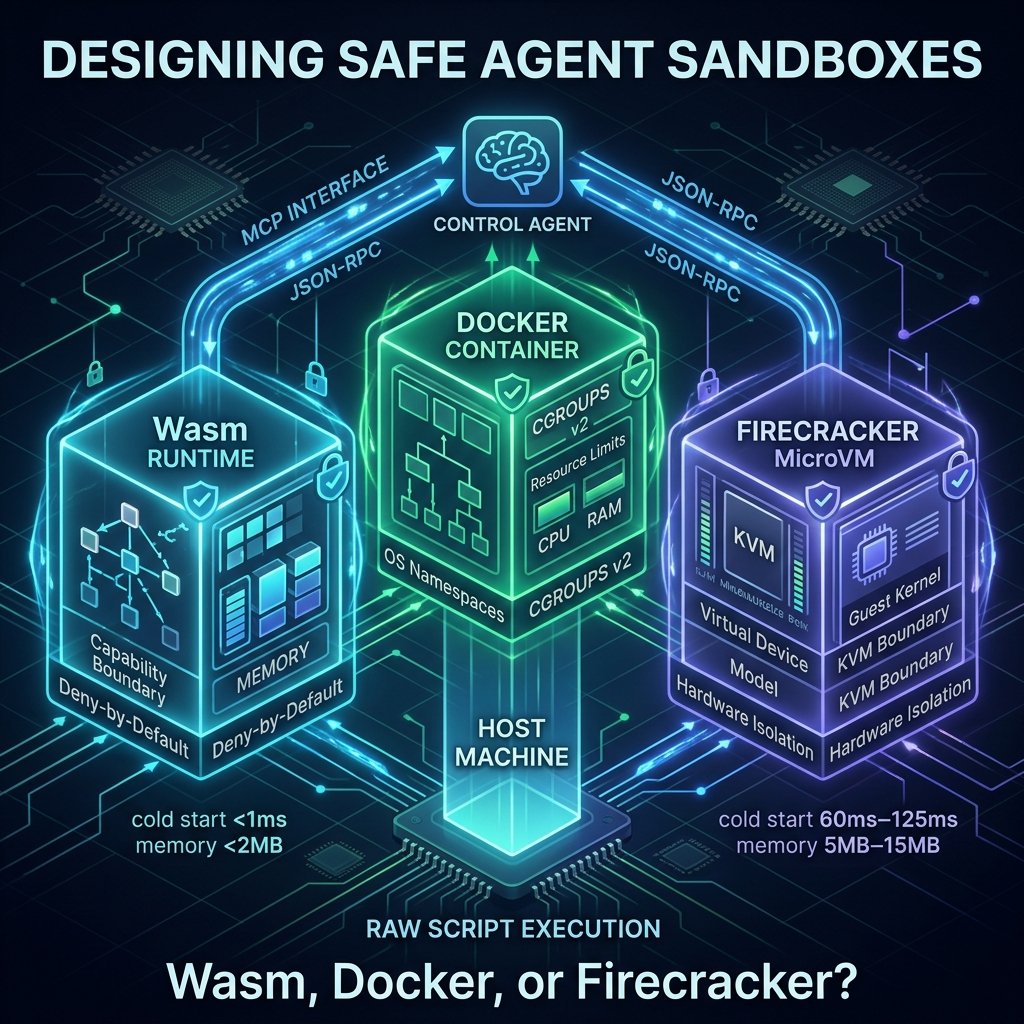
When selecting an isolation boundary for untrusted agent execution, engineers must trade off cold-start latency, resource overhead, and security boundary strength.
┌────────────────────────────────────────────────────────────────────────┐
│                     SANDBOX ISOLATION LAYERS                           │
├────────────────────────────────────────────────────────────────────────┤
│                                                                        │
│  ┌────────────────────────┐  ┌──────────────────────┐  ┌─────────────┐  │
│  │ DOCKER CONTAINERS      │  │ WEBASSEMBLY (WASM)   │  │ FIRECRACKER │  │
│  │ OS-level namespaces    │  │ In-process capability│  │ KVM MicroVM │  │
│  │ Shared Host Kernel     │  │ Deny-by-default WASI │  │ Hardware VM │  │
│  └───────────┬────────────┘  └──────────┬───────────┘  └──────┬──────┘  │
│              │                          │                     │         │
│              ▼                          ▼                     ▼         │
│       Shared Kernel              Capability Boundary   Hardware Boundary│
│      (Container Escape)           (Native Binaries)     (Strongest)     │
│                                                                        │
└────────────────────────────────────────────────────────────────────────┘
| Metric / Feature | Docker Containers | WebAssembly (Wasm) | Firecracker MicroVMs |
| Isolation Type | OS-level (namespaces & cgroups) | In-process capability VM | Hardware-level (KVM virtualization) |
| Kernel Model | Shared host Linux kernel | No kernel (WASI capability abstraction) | Dedicated guest Linux kernel |
| Cold-Start Latency | ~50ms – 200ms | < 1ms | ~60ms – 125ms |
| Memory Overhead | ~10MB – 50MB per sandbox | < 2MB per runtime instance | ~5MB – 15MB per microVM |
| Native Compatibility | Full (runs any Linux binary/OS) | Restricted (requires compilation to Wasm/WASI) | Full (runs any Linux binary/OS) |
| Security Boundary | Process isolation (vulnerable to kernel CVE escapes) | Strict memory sandboxing & capability checks | Hardware boundary (virtualization-level security) |
Step-by-Step Implementation: Docker Sandbox via MCP Interface
Using the Model Context Protocol (MCP), you can expose a ephemeral Docker execution container directly to an AI agent. The agent requests command execution over JSON-RPC, while the host manages the lifecycle of the sandboxed container.
Python MCP Server Implementation
Python
# mcp_sandbox_server.py
import docker
import json
from mcp.server.fastmcp import FastMCP

mcp = FastMCP("AgentDockerSandbox")
docker_client = docker.from_env()

@mcp.tool()
def run_code_in_sandbox(script_contents: str, timeout_seconds: int = 5) -> str:
    """
    Executes Python code inside an ephemeral, resource-constrained Docker container.
    """
    container = None
    try:
        # Spin up hardened ephemeral container
        container = docker_client.containers.run(
            image="python:3.11-slim",
            command=["python", "-c", script_contents],
            detach=True,
            network_mode="none",          # Block network egress completely
            mem_limit="128m",             # Strict 128MB RAM cap
            nano_cpus=1000000000,         # Cap CPU execution to 1 vCPU core
            read_only=True,               # Read-only root filesystem
            security_opt=["no-new-privileges:true"],
            cap_drop=["ALL"]              # Drop all Linux kernel capabilities
        )

        # Wait for container execution with strict timeout
        result = container.wait(timeout=timeout_seconds)
        logs = container.logs(stdout=True, stderr=True).decode("utf-8")

        return logs if logs else "Execution completed with no output."

    except docker.errors.ContainerError as e:
        return f"Runtime Error: {str(e)}"
    except Exception as e:
        return f"Execution Timeout or Isolation Violation: {str(e)}"
    finally:
        if container:
            try:
                container.remove(force=True)
            except Exception:
                pass

if __name__ == "__main__":
    mcp.run()
Resource Constraints & Limits: Enforcing System Guardrails
To prevent untrusted code from launching Denial of Service (DoS) attacks on host hardware, every sandbox runtime must enforce strict limits at the container/process level:
- Compute & Memory Limits (cgroups v2): Restrict execution to fractional CPU cores (
nano_cpus) and enforce a hard RAM ceiling (e.g., 128MB). Setmemory-swapequal tomemory_limitto prevent disk thrashing. - Execution Timeouts: Enforce hard process termination limits (e.g., 5 seconds) at both the host process wrapper and the container engine level to kill infinite loops.
- Network Egress Policies: Default to
network_mode="none"for pure code evaluation. If the agent requires API access, route egress traffic through an authenticating proxy sidecar with strict domain allowlists. - File System Ephemerality: Mount a temporary
tmpfsvolume in memory for scratch disk operations, ensuring no generated state persists after container teardown.
📌 Key Takeaways: Selecting the Right Isolation Technology
- Use WebAssembly (Wasm) when: You require sub-millisecond cold starts, low memory footprints, and are running computational code (e.g., math transforms, string formatting) that can be compiled to WASI target architectures.
- Use Hardened Docker Containers when: You need native Python/NodeJS library compatibility, but are operating in a single-tenant or internal-only environment where shared host kernel risks are acceptable.
- Use Firecracker MicroVMs when: You are building multi-tenant platforms, running completely untrusted multi-language user/AI scripts, or require hardware-level virtualization boundaries against container escapes.
Frequently Asked Questions (FAQ)
Is standard Docker isolated enough for running completely untrusted AI-generated scripts?
No. Standard Docker containers share the host operating system kernel.
If an AI agent generates code that exploits a zero-day Linux kernel vulnerability (such as a container escape bug), it can escape the container process and gain root access on the host node.
For untrusted multi-tenant AI code execution, standard Docker should be replaced or augmented with hardware-virtualized microVMs (like Firecracker or Kata Containers) or user-space kernels (like gVisor) to guarantee hardware or abstraction security boundaries.