Teaching Systems Architecture to Beginners Using Agentic Simulation
Teaching distributed systems to beginners has long suffered from a reality gap: students write code on single-instance localhost setups, but production systems fail across complex, high-concurrency networks.
Using AI agents to simulate active users, network partitions, and node failures bridges this gap. By deploying agentic simulation sandboxes, educators can give early-stage developers hands-on experience with scale, race conditions, and system resilience without requiring expensive cloud infrastructure.
1. The Localhost Dilemma in Systems Education
Teaching systems architecture to beginners presents a fundamental pedagogical bottleneck: scale is hard to recreate on a laptop.
- The Localhost Illusion: On a developer’s machine, network latency is effectively zero, memory feels infinite, and service calls execute sequentially without real-world interference.
- Abstract Concepts: Topics like eventual consistency, race conditions, circuit breaking, and load balancing feel theoretical when students cannot visually or programmatically experience the failure states that justify them.
- Cost and Complexity Barriers: Spin up multi-region Kubernetes clusters or live cloud environments for every student, and cloud bills, account management, and setup overhead quickly become unsustainable.
Agentic simulation solves this by turning a single Docker setup into an active distributed ecosystem where multi-agent workflows generate lifelike traffic patterns and unpredictable runtime faults.
2. Building the Simulation Sandbox with Agentic AI
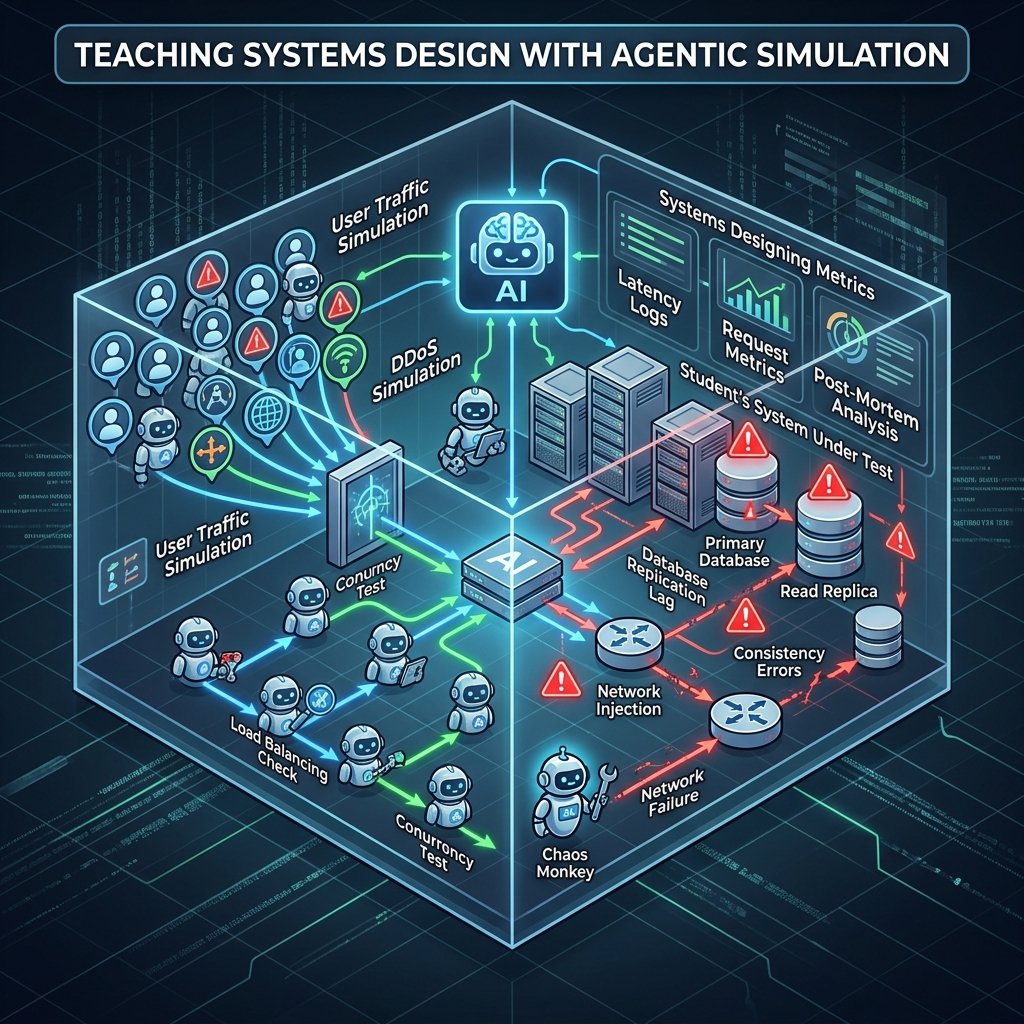
Instead of using static load-testing scripts (like JMeter or Locust) that generate predictable, uniform HTTP spikes, agentic simulations deploy semi-autonomous AI agents. These agents act as unique clients, background tasks, or faulty microservices.
+-----------------------------------------------------------------------------------+
|                            AGENTIC SIMULATION ENGINE                              |
|                                                                                   |
|  +--------------------+     +---------------------+     +----------------------+  |
|  |   User-Behavior    |     |  Chaos Orchestrator |     | Network Interceptor  |  |
|  |       Agents       |     |        Agent        |     |        Agent         |  |
|  +---------+----------+     +----------+----------+     +----------+-----------+  |
|            |                           |                           |              |
+------------|---------------------------|---------------------------|--------------+
             | (Variable Traffic)        | (Simulated Outages)       | (Injected Latency)
             v                           v                           v
+-----------------------------------------------------------------------------------+
|                          STUDENT SYSTEM UNDER TEST (SUT)                          |
|                                                                                   |
|     +------------------+       +-------------------+       +-----------------+    |
|     |  API Gateway /   | ----> |  Backend Services | ----> | Database Cluster|    |
|     |  Load Balancer   |       |   (App Nodes)     |       | (Primary/Replicas) |
|     +------------------+       +-------------------+       +-----------------+    |
+-----------------------------------------------------------------------------------+
Key Components of an Agentic Sandbox
- User Behavior Agents: LLM-driven or state-machine agents that navigate the application with non-linear paths—retrying on failure, abandoning carts, double-clicking buttons, or hammering endpoints during flash sales.
- Chaos Orchestrator Agent: An supervisor agent that monitors system metrics and dynamically injects failure conditions (e.g., stopping a container, spiking CPU utilization, dropping TCP packets) based on classroom objectives.
- Network Latency Interceptor: Proxies that delay or reorder packet delivery between services to force concurrency bugs to the surface.
3. Interactive Scenario Design
Educators can deploy pre-packaged scenarios where students must monitor, diagnose, and refactor their local applications under pressure.
Scenario A: Simulated DDoS & Rate-Limiting Responses
- The Setup: A fleet of user-agents begins making standard requests to a student’s API. Gradually, a subset of agents transitions into malicious behavior—sending rapid burst requests to expensive search or checkout routes.
- The Failure Mode: The student’s application exhausts thread pool limits, causing responses to time out for legitimate user agents.
- The Task: Implement a Token Bucket or Leaky Bucket rate-limiting middleware at the API Gateway layer to shed malicious traffic while keeping error rates low for legitimate users.
Scenario B: Replication Lag & Eventual Consistency Errors
- The Setup: Students build an e-commerce inventory service backed by a primary-replica database model. User agents purchase items while secondary read-replica agents verify available inventory stock.
- The Failure Mode: The Chaos Agent introduces a 500ms network delay between the primary database and read-replicas. User agents purchase the last remaining item, but subsequent read queries hit lagged replicas, resulting in oversold inventory (“double-spend” state).
- The Task: Refactor read paths for critical operations (e.g., checkout validation) to force strong consistency reads directly from the primary database, or implement optimistic locking patterns.
4. Guided Post-Mortem Exercises: Writing RCAs
Engineering education often overemphasizes fixing code while neglecting system observability and root-cause analysis. Agentic simulations provide telemetry logs that mirror real production incidents.
Structuring the Incident Review
After a simulation run, students analyze generated logs, metrics (Prometheus), and traces (Jaeger) to complete a Root Cause Analysis (RCA) report using the following structure:
Incident Post-Mortem Summary
------------------------------------------------------------------
1. Incident Timeline : Exact timestamps from agent trigger to resolution.
2. Impact           : Percentage of agent requests that failed (4xx/5xx).
3. Root Cause       : Why the infrastructure or code failed under load.
4. Corrective Action: System/code architecture changes made to prevent recurrence.
5. Verification     : Metrics showing success during the rerun simulation.
Teaching students to identify why a system failed using structured telemetry builds production-ready intuition far faster than traditional code-debugging assignments.
5. Tooling Stack & Setup Guidance
To maintain simplicity, keep the stack light enough to run locally on standard developer laptops using open-source, containerized components.
| Component | Recommended Tooling | Role in Teaching Sandbox |
| Containerization | Docker Desktop / OrbStack | Isolates services, databases, and network bridges |
| Service Composition | Docker Compose | Defines multi-node topologies (e.g., 1 gateway, 2 app instances, 2 DB nodes) |
| Agent Orchestration | LangGraph / AutoGen / Python Asyncio | Orchestrates user-agent traffic flows and failure injection logic |
| Chaos Injection | Toxiproxy / Chaos Mesh (lite) | Simulates network latency, bandwidth throttling, and connection drops |
| Observability Stack | Grafana + Prometheus + Loki | Teaches students how to read CPU/Memory metrics, request rates, and central logs |
6. Frequently Asked Questions
Q: How do you keep simulated environments low-cost and runnable on student laptops?
A: You do not need expensive LLM calls running continuously for every simulated request. Use a hybrid agent design: use lightweight LLM orchestration to determine high-level agent strategies and scenarios, but execute the low-level HTTP requests using lightweight, non-blocking asynchronous Python runtime tasks (asyncio / httpx) or Go routines within local Docker networks. This keeps memory usage low, executes locally without cloud costs, and costs $0 in API usage during active classroom testing.